Adswizz Javascript HTML5 SDK
Description
The Adswizz JS SDK provides synchronized metadata callbacks and ad companion banner functionality.
This SDK works with AIS 7.2 and higher which has activated 'set-session-cookie' flag activated inside of 'listen-socket' section.
Eg:
       <listen-socket>
              ...
              <set-session-cookie>1</set-session-cookie>
              ...
       </listen-socket>
Adding the Adswizz WebSDK into the player page (Integration Steps)
If you don't already have the Adswizz JS HTML5 SDK, grab it from the test page (or ask for it @AdsWizz).
- Load JS library into your Player Page Insert this line after your tag, at the very beginning of the page
<script src="adswizzsdk.min.js"></script>
- Call
adswizzSDK.initmethod with your values
Example of initialisation:
<script type="text/javascript">
    window.onload = function() {

        function changedMetadata(metadataString) {
            //do whatever you want with synchronized metadata string
            metadataLabel.innerHTML = metadataString;
        }

        adswizzSDK.init({
            //set here audio element object (This is a mandatory field!)
            contentPlayer : document.getElementById('contentPlayer'),
            playerId : “Example_Player_JS”,
            /*
            metadata : {
                listeners : [changeMetadataFunction],//register here synchronized metadata callbacks
                pollingInterval: 2500, //in milliseconds. Recommended 2000
                connectionType : adswizzSDK.MetadataConnection.LONG_POLLING,//Recommended AUTO
            },
            */
            //if not defined, then companionBanner feature is DISABLED
            companionBanner : {
                containers:[document.getElementById("companionBannerDiv"), document.getElementById("anotherBannerDiv")],
                size: [720,80], //[width,height] - not mandatory
                baseURL: "https//demo.deliveryengine.adswizz.com/www/delivery/afr.php",
                zoneId: "3",//commercial zone for display ads.
                fallbackZoneId : "32",//for the case when the audio ad doesn't have a companion
                alwaysDisplayAds : true//if true, Adswizz will take control of the companion banner outside of the ad break also.
            }
        });

        adswizzSDK.addMetadataChangedListener(changeMetadataFunction);
    }
</script>
- Decorate audio source URL before start playing.
<audio crossorigin="use-credentials" id="contentPlayer">
</audio>
    ...
    ...
    ...
    function playAudio() {
        var audio = document.getElementById(‘contentPlayer');
        audio.src = adswizzSDK.decorateURL(radioUrl);
        audio.useCredential = true;//it's important to use useCredential here or in audio tag elemeng
        audio.play();
    }
Obs: If you are using com_adswizz_synchro_decorateUrl from SynchroClient2.js it’s no need anymore to call it.
adswizzSDK namespace is taking care of loading SynchroClient2.js and register2.php.
- Stop audio.
   function stopAudio() {
        var audio = document.getElementById('contentPlayer');
        if (audio == null) {
            return;
        }
        audio.pause();
        audio.currentTime = 0;

        //some browsers will continue to play even after pause() method call.
        setTimeout(function() {
            audio.src = "http://fake_Stream_Address_To_ForceStop_Playback.hack";
            audio.play();
            }, 1);
   }
NEW! DVR and Session support
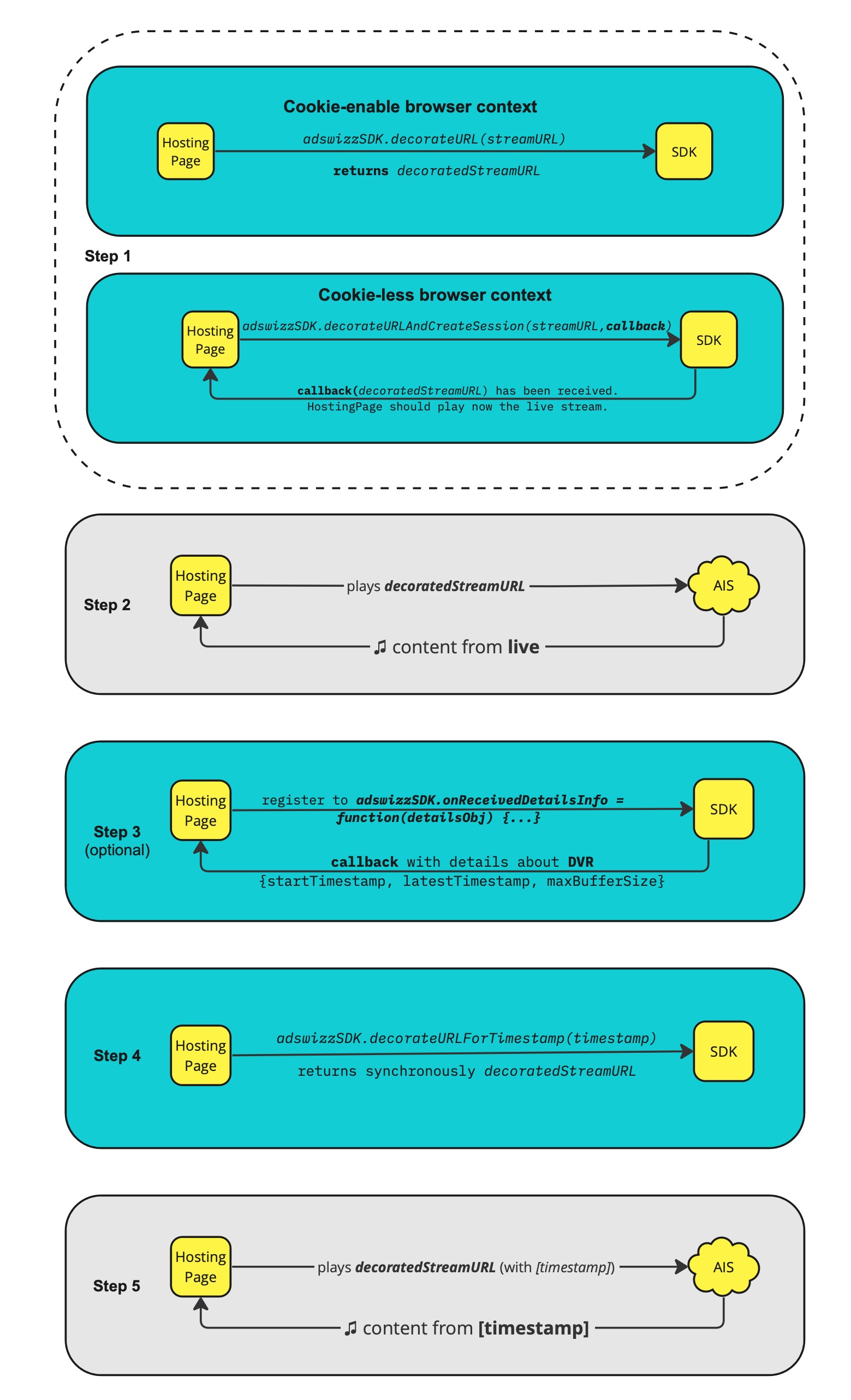
In order to benefit from the Session support feature - that enables the Second Metadata Connection (SMC) in a Cookie-less browser context - you should use the decorateURLAndCreateSession(streamURL, callback) method instead of decorateURL(streamURL).
In order to benefit from the DVR support feature, you need to follow 2 additional steps (step 4 & 5) than a Live Stream integration. More details in the below diagram.
Example of use
   window.onload = function() {


          function changeMetadataFunction(metadataString) {
                 metadataLabel.innerHTML = metadataString;
          }

          function adsWizzCompanionOutOfContextFunction() {
                 document.getElementById("companionBannerDiv").innerHTML = "stopped";
                 console.log("<<<<BANNER LISTENER>>>>> adsWizzCompanionOutOfContextFunction");
          }

          function adsWizzCompanionWillDisplayFunction(companionBannerURLString) {
                 console.log("<<<<BANNER LISTENER>>>>> adsWizzCompanionWillDisplayFunction srcURL = " + companionBannerURLString);
          }

          function adsWizzCompanionWillDisplayFallbackFunction(fallbackBannerULRString) {
                 console.log("<<<<BANNER LISTENER>>>>> adsWizzCompanionWillDisplayFallbackFunction srcURL = " + fallbackBannerULRString);
          }

          adswizzSDK.init({
                 //You can disable the load of register2.php script that is used to appened the listenerID. By default this value is true and the listenerID is append. You can disable it by setting the value to false
                 listenerConsent: true,

                 //You can set here the audio element object. This is a mandatory field but it can be set also later after the init method using adswizzSDK.setContentPlayer("audio player")
                 contentPlayer : document.getElementById('contentPlayer'),

                 //You can set here your playerId provided by Adswizz. This is a mandatory field and needs to be set right from the start.
                 playerId : "Example_Player_JS",

                 //If the metadata fields are not defined then the default values are used. However it is recommended to keep the default values unless otherwise specified.
                 metadata : {
                     listeners : [changeMetadataFunction], //register here synchronized metadata callbacks
                     pollingInterval: NUMERIC_VALUE, //It is defined in miliseconds, replace NUMERIC_VALUE with desired value (if not defined the default value is 2000)
                     connectionType : adswizzSDK.MetadataConnection.LONG_POLLING,//if not defined the default value is TIMED_POLLING, you can choose between the 4 predefined values
                 },

                 //If the following companionBanner section is not defined then the companionBanner feature is DISABLED.
                 //You can also set the companionBanner config later after the init method using adswizzSDK.setCompanionBannerConfig(bannerConfigObj);
                 companionBanner : {
                        container   : document.getElementById("companionBannerDiv"), //Not mandatory. If not set you should register with callbacks to get the companionAd URL and load it on your own.
                        containers  : [document.getElementById("div1"), document.getElementById("div2")], //NEW! Not mandatory. If not set you should register with callbacks to get the companionAd URL and load it on your own.
                        size        : [720,80], //width,height in pixels. The 720/80 is used here just as an example, you can put whatever values here.
                        baseURL     : "https://[YOUR_ADSERVER_INSTANCE].deliveryengine.adswizz.com/www/delivery/afr.php", //can be http also. [YOUR_ADSERVER_INSTANCE] should be provided by AdsWizz.
                        zoneId      : "[YOUR_ZONE_ID]", //commercial zone for display ads. Should be a numeric value from your AdServer instance provided by Adswizz
                        fallbackZoneId  : "[YOUR_FALLBACK]", //the fallback display zone id. It can be used when audio ad doesn't have a companion banner and you need to display one or it can be used outside of the adbreak itself (as a filler element). Should have numeric value.
                        alwaysDisplayAds : true, //Can be true or false. If set on true then the companion banner will be shown on display outside of the ad break as well, not only during the audio ad break.
                        extraExposureTime: 5000, //Time in milliseconds defining how long the sync-banner is supposed to be visible after the ad playout. Default value is 0 ms, meaning the sync-banner is removed when the ad ends.
                        outOfContextListener : adsWizzCompanionOutOfContextFunction, //Not mandatory. This function is called when needed to inform the player that the rendering of the display ad has finished.
                        willDisplayListener : adsWizzCompanionWillDisplayFunction, //Not mandatory. Contains the srcURL and it is called when synchronized companion ad will be rendered.
                        willDisplayFallbackListener : adsWizzCompanionWillDisplayFallbackFunction //Not mandatory. Contains the srcURL and it is called when the fallback companion ad will be rendered.
                 }
          });


          adswizzSDK.addMetadataChangedListener(changeMetadataFunction);

   }
For complete API documentation use the above 'Namespaces' menu.
Changelog
All notable changes to this project will be documented in this section.
The format is based on Keep a Changelog, and this project adheres to Semantic Versioning.
[1.3.5] - Dec 2024
Added
- Introduced the ability to register and display multiple companion banners. The
companionBannerconfiguration now includes a newcontainersfield of typeArray, allowing for the specification of multiple banners.
[1.3.4] - Oct 2024
Fixed
- Resolved the issue with
Session Support. The/generateSDKSessionIdrequest was incorrectly using a cookie, even though it’s unnecessary, asSession Supportfeature is intended to replace cookie usage.
[1.3.0] - Dec 2022
Added
- Added Session (AISSessionID) & DVR support
- Added new API methods (more details in Documentation API):
decorateURLAndCreateSession(streamURL, callback)decorateURLForTimestamp(timestamp)resetSession()
Fixed
- Fixed
Second Metadata Connection(SMC)cache buster (cb) issue
Changed
onReceivedDetailsInfofunction received an extra parameter:errorObjobject. The new function signature isfunction(detailsObj, errorObj)
[1.2.2] - Nov 2022
Added
- Added the possibility to skip Cookie sync if consent is not given
[1.2.1] - Jul 2022
Added
- Added listener consent flag on initialisation method
Changed
- Now the scripts used to get the listener id are loaded after the initialisation method. By default these scripts are loaded, but they can be turned off if the "listenerConsent" value is set to false.
- The companion banner callbacks now include the bannerSrcURL
[1.1.5] - Jan 2018
Added
- Companion banner (
AdswizzCompanionView) - Synchronised metadata callbacks
Changed
- Now the companion banner callbacks are always triggered regardless if the "alwaysDisplayAds" option is set on true or false
- The companion banner callbacks now include the
bannerSrcURL
[1.1.4] - Feb 2017
Fixed
- Fixed an issue when banner doesn't disappear when pausing during an ad break
[1.1.3] - Jan 2017
Changed
- Used protocol relative paths.
[1.1.2] - Dec 2016
Changed
- Small improvements added to the test page
[1.1.1] - Nov 2016
Fixed
- Fixed start-stop issue when using addEventListener attached to HTML5 player.
- Fixed
aw_0_1st.playeridsite variable.
Changed
- Use
geolocationforhttpsrequests only
[1.1.0] - Oct 2016
Added
- Added
playerId&geoLocationin decorateURL
Fixed
- Fixed
aw_0_1st.playeridsite variable.
[1.0.15] - Aug 2016
Fixed
- Fixed "invalidURI" error and an use case when the
alwaysDisplayAdis false
[1.0.14] - Aug 2016
Fixed
- Typo fixes
[1.0.13] - Jul 2016
Fixed
- Fix
iframeheight for companion banners
[1.0.11] - Jul 2016
Fixed
- Fixed
adswizzContextparser error - Fixed reset cache onStopAudio
Changed
- Changed default for
alwaysDisplayAds
[1.0.8] - Mar 2016
Fixed
- Removed hardcoded
AFRrequest.
[1.0.2] - Feb 2016
Fixed
- Various small fixes
[1.0.0] - Feb 2016
Added
Second Metadata ConnectionfeatureCompanion Bannersupport
=============================
Copyright (C) 2023 AdsWizz, Inc. All rights reserved.